A process graphic you can inspect
An eight-second process graphic with three staggered cards and a moving progress marker, built from 18 editable Chorono layers. Preview the animation here, or select a marked moment to examine the design.
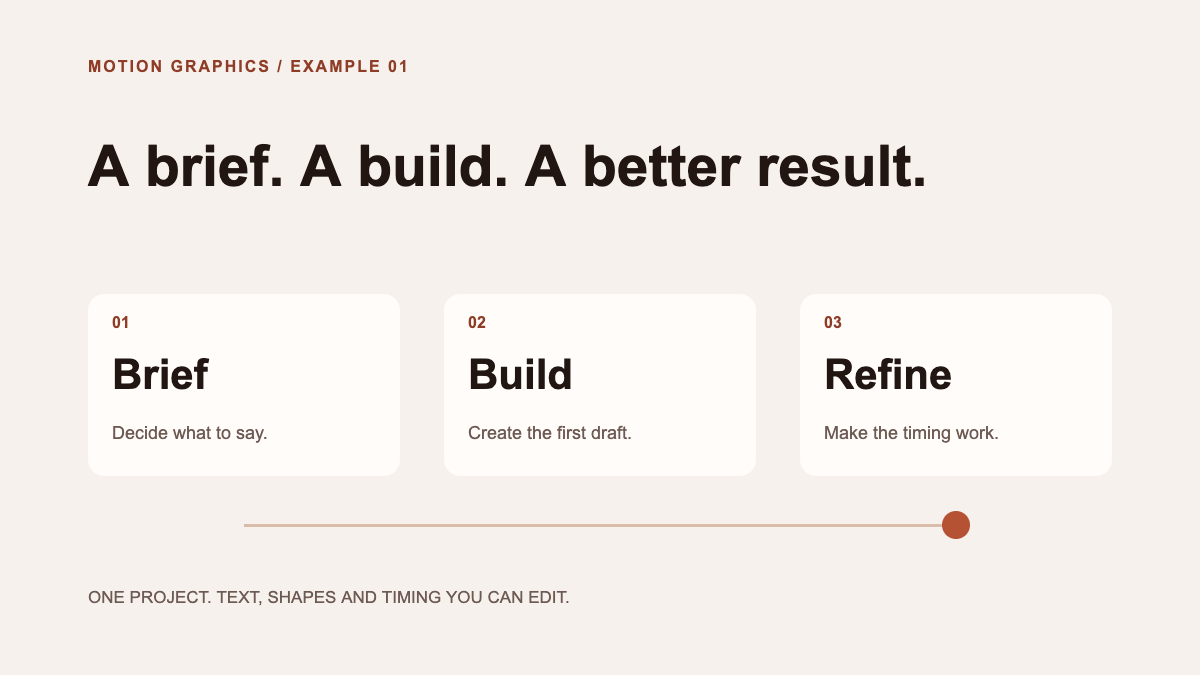
Project notes: 1200 × 675 · 30 fps · 18 named layers · 26 animation tracks. Authored through Chorono MCP with AI assistance; representative frames and the actual exports were checked on November 5, 2026. Scene validation and runtime export returned no warnings. These projects use Arial and native shapes, with no external media files.
What this project shows about the editor
A motion graphic turns a layout into a sequence. In this process diagram, the viewer first sees the brief, then the build, then the revision. Each card has its own background, number, title and explanation. The moving marker connects the steps without covering their labels.
The downloadable scene contains 18 named layers and 26 animation tracks on one eight-second timeline. Each card and its three text layers share an entrance time. You can select the “Build title” layer to change the wording, adjust the marker’s position keys to change its travel, or move an entire card’s entrance by shifting its related tracks together.
Chorono exposes that scene in a motion graphics editor running locally in your browser. You can work directly with its layers and timeline. Its MCP connection also lets Claude Code or Codex inspect and edit the same objects. The saved JSON keeps the text, shapes and keyframes available for your next revision.
What can you make with these motion graphics tools?
Start with one message and a small set of objects. A useful first project has a clear reading order, a short movement and a final state that communicates the idea on its own. These three downloadable studies show different uses for the same editor:
- A process diagram: use Brief to motion above to explain three steps. Adapt the cards to an onboarding sequence or a feature explanation, then check the copy at the final display size.
- An animated title: inspect the text animation example to combine two text entrances with an underline and a reading hold.
- Moving type with emphasis: explore kinetic typography to see how word order, scale and pauses change the way a sentence is read.
Each study has a playable preview and an editable source file. Choose the one closest to your task and try a wording or timing change before building a larger composition. The preview helps you inspect the result; the local editor is where you create and revise the scene.
Compare motion graphics programs around your delivery needs
The best motion graphics software for a particular task depends on its source files, editing workflow and final destination. Start with the artifact you need to deliver. A short process illustration embedded in a web page has different requirements from a film assembled from recorded footage. Test a representative project before committing to a tool.
| Your requirement | What you can verify here |
|---|---|
| Editable 2D source | Open the project and select individual text, card and marker layers. |
| Precise timing | Inspect the staggered entrances and position keys on the timeline. |
| Local browser workflow | Install the editor on your computer, then open its browser interface. Follow the setup guide for Node.js, npm and Git requirements. |
| Agent-assisted revisions | Connect a local editor through MCP, then ask Claude Code or Codex to change a named layer. |
| Web playback | This page plays exported scene data using @chorono/runtime and a canvas. |
| Cost and source access | The editor is free and open source under MIT. Any Claude Code or Codex account is managed separately; you can also edit the scene directly. |
| Your delivery format | Download the portable project and runtime JSON here. Test the full delivery workflow if your destination requires an encoded video or GIF. |
The deliverables tested here are portable scene JSON and runtime JSON. The download is an editable project, not a finished MP4 or GIF. If your final destination needs an encoded video, check and test that additional export workflow before choosing your production setup. This example is a 2D text-and-shape composition; it does not demonstrate footage editing or 3D modeling.
If you are looking for free motion graphics software, separate the editor license from the other services in your workflow. Chorono’s source is available under the repository’s MIT license. Follow the installation guide to run the editor and check the requirements before opening your first project.
Build and revise the process graphic
| Time | What happens | What to inspect |
|---|---|---|
| 0.4–1.1 s | Brief card and its text enter together. | The first step is readable before the next arrives. |
| 1.5–2.2 s | Build enters; the marker begins its travel. | Text and card backgrounds stay aligned. |
| 2.6–3.3 s | Refine enters. | The final card has enough separation from the second. |
| 3.9–8.0 s | The marker has arrived; the complete diagram holds. | All three steps can be read in one still composition. |
- Download Brief to motion and open it with Open Scene JSON in a separate local Chorono editor tab.
- Replace one card’s wording and check the final layout. Keep its title and explanation inside the card.
- Inspect the entrance on the timeline. Move related text and background tracks together when you change a card’s start time.
- Save a portable copy, reopen it and check the result at the size where it will be shown.
For an agent revision, connect that editor tab through MCP and identify the project. This request targets a concrete change:
Read the current Brief to motion scene with the chorono skill. Change only the Build title to “Prototype” and its explanation to “Test the first idea.” Keep the card positions, fonts, colors and eight-second timing. Preserve unrelated work. Inspect the second card during its entrance and in the final hold, then validate and save a revised portable project.After a timing change, inspect the moving state and the finished layout. A final frame can hide a mismatch that occurs while a card and its text are entering. Use the keyframe animation guide to understand the stored values and the easing comparison to inspect acceleration between those values.
Keep an editable source and a playback export
Keep the portable project as the source you reopen for editing. Export runtime data for an application that needs playback. The two files serve different jobs, even when their animation tracks match.
This page uses the published @chorono/runtime package. You can also download the runtime export used by this preview and compare it with the editable project.
npm install @chorono/runtimeFor smaller studies, explore text animation and reading time or kinetic typography and word emphasis. To build through an agent, start with the setup and authoring skills and the Claude Code installation walkthrough.