
Arrange copies in a line, grid, circle or path
An array repeats a selection with a consistent placement rule. Select the source layers, then open Clone / Array → Array. The preview lets you inspect the arrangement before applying it.
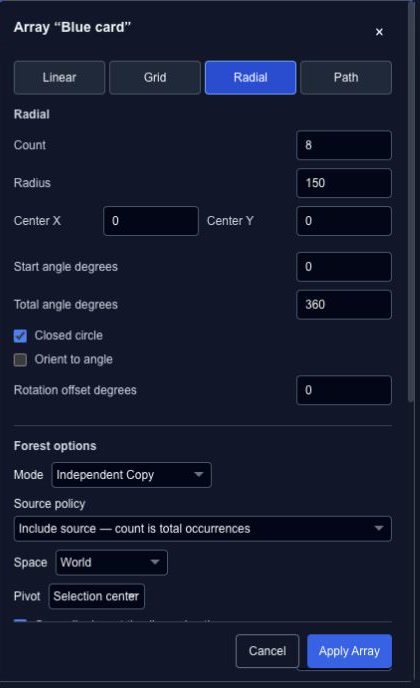
| Pattern | Main controls |
|---|---|
| Linear | Count, move, rotation and scale steps. |
| Grid | Rows, columns, row/column offsets and alternating-row stagger. |
| Radial | Center, radius, start/total angles and orientation. |
| Path | Target path, start/end offsets, normal offset and tangent alignment. |
Make a radial arrangement#
Choose Radial, start with six copies and set a radius that keeps them apart. Use Closed circle for an even ring. Turn on Orient to angle if each copy should face around the ring rather than retain the same rotation.
Review the shared options#
Choose Copy or Instance, a coordinate space and a pivot. The source policy determines whether the count includes the original selection. With animation copying enabled, Time offset per occurrence staggers each repetition.
Apply once the preview is right; Undo returns to the source selection. Changing the source while the dialog is open can invalidate the preview, so reopen it after unrelated edits. The multi-root Procedural Repeater conversion is currently unavailable in this tool.
Count copies and choose their coordinate space#
Linear, Grid, Radial and Path arrays can repeat multiple selected roots. With count 5, Include source gives four new occurrences plus the original. Clone source too gives five new occurrences and leaves the original in place. The selected pattern determines where the new occurrences are placed; check the summary before applying.
Choose World, Parent or Local space for the intended pivot and placement. A Path array follows an existing Bézier path. If a parent and child are both selected, the source branch is expanded once rather than copied twice.
Review a large array before applying#
Preview draws bounded outlines; it does not fill the source or Undo history with temporary layers. The summary reports the expanded layer and keyframe counts. A preview display cap limits the outlines you see, not the number of copies the final operation will create.
Apply creates one Undo step, and Redo keeps the generated IDs. Changes to the source, selection or time invalidate the preview. Review again before applying so it reflects the current project. See Clone and Instance for animation copying and reference behavior.