
Export a scene as SVG
Choose SVG when vector geometry is the useful output. It can preserve scalable paths and shapes, but it should not be treated as a portable copy of every editor feature.
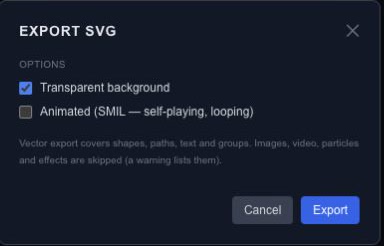
Export the intended frame#
Set the playhead to the moment you want and open SVG export. Leave Animated unchecked to export a still frame. Enable Transparent background when the SVG should sit over another page or design.
For a looping animation, turn on Animated (SMIL). Chorono converts supported transform and opacity tracks into animation inside the SVG file. It plays without the Chorono runtime in a viewer that supports SMIL; it does not carry the editor's state machines or interactions.
Check what SVG can preserve#
SVG export covers shapes, paths, text and groups. Images, video, particles and effects are skipped, and the export warnings identify unsupported content. Review those warnings before treating the download as a faithful copy of the scene.
Inspect the result#
Open the downloaded file in the application or browser where it will be used. Compare dimensions, text, strokes, clipping and effects with the editor. A supported static shape and a filtered or media-rich scene have different conversion needs.
If the visual result matters more than vector editability, use a still image. For Chorono playback and interaction, export runtime JSON. Keep the editable project regardless of which output you share.
Review SVG export compatibility#
SVG export represents supported shapes, paths, text and groups. Unsupported layer types are reported, and masks, effects or blend modes can produce appearance warnings. The exporter does not silently rasterize unsupported content to make it look complete.
Animated SVG does not execute live property expressions. Review the export diagnostics and use a supported conversion or bake workflow where appropriate, then test the actual SVG in the destination browser. Baking a value into keys is not a guarantee that every key type or interpolation mode is supported by SVG.
Choose raster output when the final appearance depends on unsupported SVG features, and retain the editable project so the choice remains reversible.